

Aller au contenu
View in the app

A better way to browse. Learn more.

Cani-Seniors

A full-screen app on your home screen with push notifications, badges and more.

To install this app on iOS and iPadOS
  1. Tap the Share icon in Safari
  2. Scroll the menu and tap Add to Home Screen.
  3. Tap Add in the top-right corner.
To install this app on Android
  1. Tap the 3-dot menu (⋮) in the top-right corner of the browser.
  2. Tap Add to Home screen or Install app.
  3. Confirm by tapping Install.

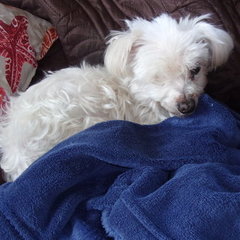
Arthur est un grand chien !
<t></t>

  1. 1. <t></t>

Veuillez vous connecter ou vous inscrire pour voter dans ce sondage.

Featured Replies

Posté(e)

Mon copain Marc avait un chien, c'était son grand Milou qui l'a quitté voilà quelques semaines maintenant. C'était son "Grand Chien". Aujourd'hui, c'est Arthur qui est le " Nouveau Grand Chien", ou "Tonton ".......................faut se débrouiller :wink::wink:


tonton 001.JPG

Posté(e)

emouvante photo.... :D

Posté(e)

Même pensée que TO :D

Posté(e)

Jolie séance de calins :D

Posté(e)

Ah mon papinou, ton charme a agit une fois de plus :D Tu es un sacré privilegié, tu l'as trouvé ton paradis, chez Floflo et dans les bras de Marc :wink:


Branka

Posté(e)
:lol: Merci que du bonheur
Posté(e)

Ces petits loulous d'amour ont un pouvoir pour sécher nos larmes :wink: , petit ARTHUR l'a ressenti :wink: !!!!!!!!!!!!!!!!!!


Cathy

Posté(e)
:lol::lol: ADORABLE un vrai pti roi de coeur :lol:
Posté(e)

Il a gagné le gros lot le pépère :wink:

Posté(e)

Arthur, tu as tout compris mon papy... Devenir "le" chien de Marc est un grand honneur et un grand bonheur.... :P ...

Posté(e)

Adorable.

Posté(e)

Arthur, tu as tout compris mon papy... Devenir "le" chien de Marc est un grand honneur et un grand bonheur.... ...

_________________


Pour Marc, c'est sur :D

Posté(e)
:D
Posté(e)

Arthur est un petit fûté. :wink:

Account

Navigation

Rechercher

Rechercher

Configure browser push notifications

Chrome (Android)
  1. Tap the lock icon next to the address bar.
  2. Tap Permissions → Notifications.
  3. Adjust your preference.
Chrome (Desktop)
  1. Click the padlock icon in the address bar.
  2. Select Site settings.
  3. Find Notifications and adjust your preference.
