

Aller au contenu
View in the app

A better way to browse. Learn more.

Cani-Seniors

A full-screen app on your home screen with push notifications, badges and more.

To install this app on iOS and iPadOS
  1. Tap the Share icon in Safari
  2. Scroll the menu and tap Add to Home Screen.
  3. Tap Add in the top-right corner.
To install this app on Android
  1. Tap the 3-dot menu (⋮) in the top-right corner of the browser.
  2. Tap Add to Home screen or Install app.
  3. Confirm by tapping Install.

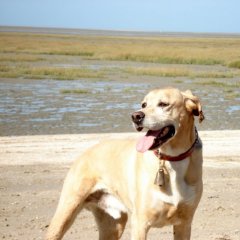
Ninon 2 ans dans ma nouvelle vie
<t></t>

  1. 1. <t></t>

Veuillez vous connecter ou vous inscrire pour voter dans ce sondage.

Featured Replies

Posté(e)

Bon anniversaire petite Ninon, tu as une bouille à croquer. :lol::lol:

Posté(e)
  • Auteur

merci à tous pour vos gentils petits mots :-)

ma môman elle me dit que je vais avoir les chevilles qui enflent, vous croyez que c'est possible pour un chien :roll:

Pour le choix de mon nom je crois ne pas me tromper en disant que c'est ma Tatie Mary qui me l'a choisi et .. il me plaît :P

Posté(e)

Pour le nom, à son arrivée, je cherchais un nom et j'ai une de mes chattes qui s'appelle Ninette qui est venue nous accueillir...

Quand j'étais petite mon père me chantait une chanson d'Yves Montant dont j'ai oublié les paroles mais qui parlait de "ninon, ma ninette"... et voilà...

Je suis ravie, Ninon, que ton nom te plaise... :P

Account

Navigation

Rechercher

Rechercher

Configure browser push notifications

Chrome (Android)
  1. Tap the lock icon next to the address bar.
  2. Tap Permissions → Notifications.
  3. Adjust your preference.
Chrome (Desktop)
  1. Click the padlock icon in the address bar.
  2. Select Site settings.
  3. Find Notifications and adjust your preference.
